admin
admin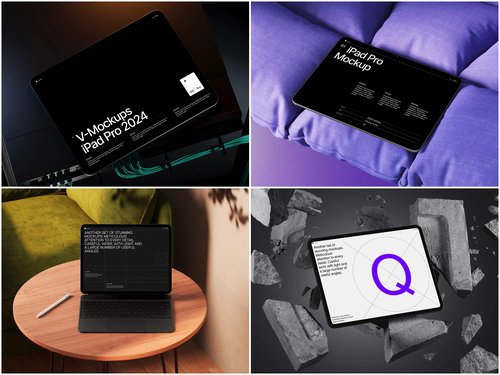
Trust is the new currency of digital marketing. Where brands once spent millions on glossy photo shoots and studio productions, more and more companies today are betting on something different: real, living, user-generated content. UGC (User Generated Content) stopped being a trend long ago — it has become the standard. But how do you combine the authenticity of UGC with professional visual quality? This is exactly where mockups enter the stage.
Why UGC and Mockups Are an Unexpectedly Perfect Match
At first glance, mockups and user-generated content seem like an unlikely pair. UGC is valued for its naturalness, mockups — for their polish. But in practice, things are far more interesting.
When a real customer shares a photo of their new app, service, or digital product, they don’t always manage to convey the essence visually. A phone screenshot looks dull. A photo of a screen — blurry. But an iPad mockup with a real user interface or content inserted into it — that’s a completely different story. It’s honesty wrapped in a beautiful package.
Brands understood this before anyone else: a mockup doesn’t hide UGC, it amplifies it.
The Mechanics of Trust: How It Works Psychologically
Today’s consumers are trained to be skeptical. They can tell promotional content from real content in a fraction of a second. And that’s exactly why UGC works — it doesn’t shout “buy me,” it whispers “look how this looks for a real person.”
When a brand takes a genuine customer review, frames their screenshot in an iPad mockup, and publishes it in stories or on a landing page — something magical happens: the content looks professional, but feels like a personal recommendation. This lowers the trust barrier and increases conversion.
Research shows that visually presented reviews receive 3–4 times more engagement than text-only ones. And when they’re placed inside a beautifully rendered device mockup — engagement grows even further.
Real-World Examples of iPad Mockups in Brand Practice
Theory is great, but let’s look at how this actually lives in the real world.
Educational platforms. One of the most vivid examples — online schools and EdTech services. Coursera, Skillbox and their counterparts actively use interface screenshots inside iPad mockups to showcase the user experience. When a real student shares their progress and the brand frames that screenshot in a mockup and posts it on Instagram — it looks simultaneously professional and genuinely human.
SaaS and B2B tools. Companies like Notion, Figma and Miro regularly show real user workspaces through tablet mockups. It works as social proof: “Look, real people use this every single day.”
E-commerce and lifestyle brands. Stores selling digital goods — courses, guides, templates — insert product previews into iPad mockups for their product cards. The buyer immediately sees what their purchase will look like “in real life.”
Mobile applications. Startups promoting their apps through UGC use iPad mockups on the App Store and landing pages to showcase the real interface in an appealing context — without a studio or an advertising budget.
iPad Mockups on ls.graphics: When Quality Speaks for Itself
If you’re seriously thinking about integrating mockups into your content strategy, it’s worth knowing where to find truly outstanding tools. ls.graphics is one of those platforms that sets the quality standard for the industry.
Ultra-realistic rendering, organized layers, a wide range of angles and color styles, stylish minimalist scenes, the Edit Online feature, and a large number of free scenes to get started — all of this makes their iPad mockups not just pretty pictures, but a genuine working tool for marketers and content creators.
How Brands Integrate Mockups into Their UGC Strategy: Step by Step
The scheme may seem simple — but the devil, as always, is in the details. Here’s what it looks like in practice for brands that do it right.
Step 1: Collecting content. Launch a hashtag campaign or reach out to your most active customers directly. Ask them to share screenshots — people are happy to do so when they feel their voice matters.
Step 2: Selecting the material. Choose screenshots that demonstrate real product value — not just “pretty,” but “clear and convincing.”
Step 3: Inserting into the mockup. Pick an angle and style that matches your brand’s tone: a clean frontal view for B2B, a light perspective shot for lifestyle.
Step 4: Publishing with credit. Always tag the real author. This isn’t just good ethics — it’s marketing: other users see that the brand values its customers, and they want to be part of that story too.
Step 5: Analyzing and scaling. Test formats, adapt your style, and gradually build a UGC content library that works for you around the clock.
The golden rule stays the same: don’t overdo the polish. UGC works precisely because it’s alive. A mockup should frame that living content — not turn it into yet another faceless advertisement.
Conclusion
Mockups have long outgrown the boundaries of designer portfolios. Today they are a full-fledged marketing tool that helps brands look professional while remaining human. In combination with UGC, they create a rare blend: beauty plus trust.
If you’re looking for a starting point — take a look at ls.graphics. There you’ll find mockups that don’t just look great, but genuinely work toward your marketing goals. Try the free scenes, feel the difference — and you’ll understand why thousands of brands around the world choose to trust them.


 Alex
Alex